Accessibility Standards in Digital Hiring Assessments for Design Roles
Design hiring tools often block qualified disabled candidates before anyone reviews their work.

A timed design-tool exercise with a 90-minute countdown. A video interview scored by software for eye contact and tone. A portfolio platform that only accepts one file format. These are standard tools in design hiring today, and each one can screen out a qualified candidate with a disability before anyone on the hiring team looks at their work, a live legal exposure right now tied to rules that just changed.
The floor moved in 2026. New ADA Title II rules, originally set to take effect in April of that year, had their compliance deadlines extended by the responsible federal agency: April 2027 for larger state and local government entities, April 2028 for smaller ones. Those rules require state and local governments to meet WCAG 2.1 Level AA standards for their digital services. That standard doesn't stop at a city's website. It shapes what gets bought across the public sector, and that includes the hiring assessment platforms those governments use. And the pressure isn't confined to U.S. public employers. The European Accessibility Act pushes the same WCAG 2.1 Level AA standard into product and service delivery for any business selling into the EU market, regardless of where that business is headquartered. A design team hiring in one city can find itself bound by the same technical bar as a vendor based in another country.
Design roles carry more of this exposure than most. The standard hiring toolkit, timed creative exercises, screen-based portfolio review, video interviews scored for behavioral cues, combines three formats that each create friction for candidates with visual, motor, or cognitive disabilities. Stacking them together in one hiring process compounds the friction.
None of this liability transfers to the company that built the software. An employer can't point to a vendor's algorithm and call the discrimination someone else's problem. The employer is responsible for the outcomes of its own selection procedures, no matter who wrote the code behind them.
WCAG 2.1 Level AA requirements for assessment tools
WCAG 2.1 Level AA is a specific, testable set of requirements for how a digital interface has to work if someone with a disability is going to use it on equal footing with everyone else.
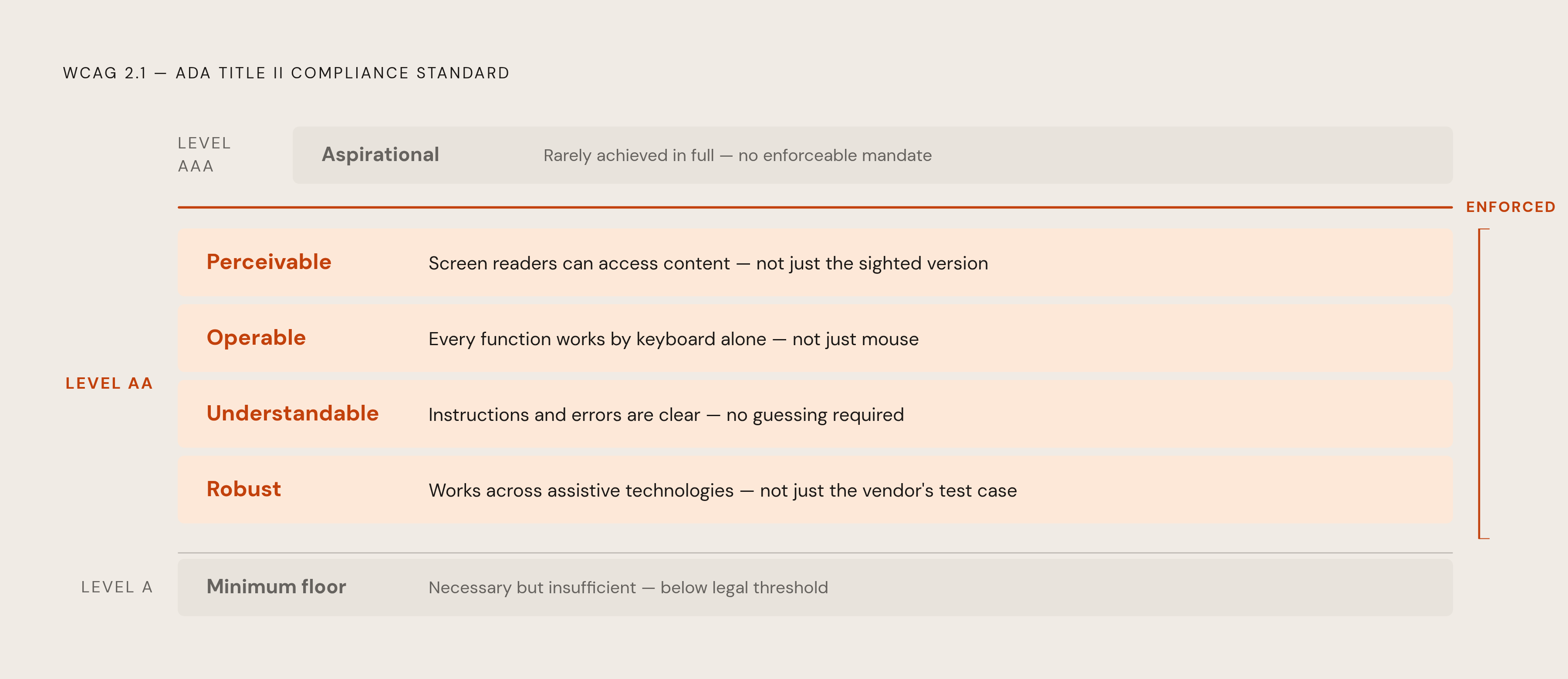
The standard rests on four principles: perceivable, operable, understandable, and robust. Perceivable means a candidate using a screen reader can actually access the content, not just the sighted version of it. Operable means every function has to work through a keyboard alone, not just a mouse or touchscreen. Understandable means instructions and error messages make sense, so the candidate doesn't have to guess at what went wrong. Robust means the tool works correctly across different assistive technologies, not just the one the vendor happened to test with.
The updated ADA Title II rule enforces Level AA as the bar. Level A sets a lower, thinner bar. Level AAA is treated as an aspirational ceiling that even well-resourced organizations rarely hit in full. Hiring teams evaluating a platform should be asking whether it meets Level AA specifically, not whether it's "accessible" in some unspecified sense.
Translate that into the formats design teams actually use. For a timed exercise: can a candidate get a time extension without the platform breaking or logging them out mid-task? For a video interview: does the scoring system penalize speech patterns or facial expressions that fall outside a narrow, typical range? For a portfolio review tool: can someone navigate the whole thing with a keyboard, and does a screen reader read it correctly?
One more thing matters here, maybe more than any single checklist item: an automated accessibility scan catches only a fraction of real-world barriers. Full WCAG conformance takes manual review, and that means testing by people who actually use screen readers, keyboard-only navigation, or voice input day to day. A vendor's claim that their platform is "accessible" is only as credible as the testing that backs it up.
The specific ways timed exercises, video scoring, and portfolio platforms create barriers
Design hiring leans on three formats more than most other disciplines, and each one fails candidates with disabilities in its own specific way. Standard procurement checklists rarely catch any of them.
Start with timed exercises. A countdown clock disadvantages candidates with processing differences, motor impairments that slow down typing or clicking, and anxiety disorders that qualify as disabilities under the ADA. A platform that doesn't let someone adjust the time limit, or that logs a candidate out automatically without warning, ends their attempt without anyone on the hiring team seeing what happened. The hiring team sees a blank submission. They don't see the countdown that locked someone out mid-sketch. Fixing this doesn't mean stripping the challenge out of the exercise; it means separating the time constraint from the actual performance measurement, or building an accommodation path that doesn't force a candidate to disclose a disability to a stranger before the process has even started.
Video interview scoring runs into a sharper version of this problem. Software that scores a candidate's recorded answers for eye contact, speech cadence, or "enthusiasm" directly penalizes anyone whose disability changes how they present on camera: Deaf candidates, candidates who use AAC devices, candidates with facial differences, candidates on the autism spectrum. An employer using a tool like this owes a reasonable accommodation to any affected candidate unless providing it would cause undue hardship, and "the vendor's algorithm did it automatically" doesn't hold up as a defense. Behavioral scoring of this kind isn't a documented, job-related proxy for design skill. Cutting it from a design assessment reduces legal risk and improves what the assessment actually measures.
Portfolio platforms carry a quieter version of the same failure. A candidate's own portfolio might live on a site that isn't accessible, but the hiring team's review interface needs to meet the standard regardless of what the candidate built. And requiring one specific submission format, a particular platform, a particular file type, can itself be the barrier. Letting candidates submit a PDF, a link, or a live walkthrough instead costs the hiring team nothing in evaluation quality and removes a barrier that has nothing to do with design skill.
How AI-assisted screening worsens the problem for design candidates
Hand the first pass of design candidate screening to an AI system, and these same barriers don't disappear; they scale. An automated system runs the same filtering logic across thousands of candidates at once, and the speed makes the harm harder to catch, because no one is sitting with each individual rejected application asking why.
The mechanism is straightforward. A model trained on historical hiring data for design roles learns the patterns baked into that data. If past hires skewed toward candidates without disabilities, the model learns to deprioritize anyone who presents differently, including candidates who describe their design process differently because they built it around assistive technology, reproducing at volume the bias already present in the data.
That leaves hiring teams with a clear operational task: any AI-assisted screening used on design candidates needs regular auditing for patterns suggesting that candidates with disabilities, or candidates whose presentation falls outside some narrow norm, are getting filtered out at a higher rate than everyone else. Skipping that audit lets the pattern continue unnoticed until a complaint surfaces it.
Designing WCAG-compliant assessments for design roles
Building an accessible hiring process for design roles means swapping out the formats that create barriers for alternatives that measure the same skills without the legal exposure. The changes here are concrete enough to put into practice this quarter, not an abstract goal to work toward someday.
Start before the platform choice: define what "good design work" looks like for the specific role first. A rubric built around job-relevant criteria, problem framing, decision-making, iteration, accessibility fluency, holds up under legal scrutiny far better than a format chosen because it was convenient to set up. This is the same logic behind writing accessibility responsibilities directly into a job description rather than leaving them implied: if accessibility testing and inclusive design judgment are part of the job, the job description and the interview questions should say so, and the assessment should measure for it directly.
For portfolio review, accept more than one submission format. PDF, a link, a live walkthrough, a recorded presentation: accepting any of these lets a candidate's actual work get seen regardless of which platform they can use. Run that review through an interface that itself meets WCAG 2.1 Level AA. The hiring team's own tooling has to meet the standard, not just whatever the candidate happened to submit. And score it against the structured rubric built earlier, so reviewers are judging design decisions, not reacting to aesthetic polish or presentation style.
For timed exercises, default to untimed or generously bounded take-home work when the role doesn't genuinely need real-time design under pressure. Where real-time assessment is actually job-related, build a clear, low-friction path to a time extension, one that doesn't require a candidate to disclose a disability before the process even begins. The ADA requires that reasonable accommodation unless it causes undue hardship, and that requirement doesn't evaporate because the accommodation request came through a hiring platform instead of an HR office. Whatever exercise platform gets used needs keyboard navigation, screen reader compatibility, adjustable time limits, and no silent, automatic logout.
For interviews, replace scored video with structured questions tied to the same rubric: ask a candidate to walk through a design decision, explain a tradeoff, describe how they handled an accessibility problem in past work. Offer more than one format, video with captions, phone, asynchronous text, so the interview format itself doesn't filter out candidates whose disability affects how they come across on camera or in live conversation. For design roles specifically, a structured portfolio walkthrough with the candidate present, talking through their own choices, produces a stronger signal than either a scored video or an unstructured review.
And for roles where accessibility is part of the job itself, UX designer, digital accessibility engineer, design systems lead, build that judgment into the assessment directly. Ask the candidate to find the barriers in a sample design, or walk through how they test for WCAG conformance. That single move does two things at once: it measures real capability, and it reduces the format bias baked into more conventional assessment types.
Evaluating assessment vendors and platforms before they create liability
Because liability stays with the employer no matter who built the tool, vetting a vendor needs to treat WCAG conformance and accommodation support as actual procurement criteria, not a line item to check after the contract's signed.
Ask for a Voluntary Product Accessibility Template, or an equivalent accessibility conformance report, tested specifically against WCAG 2.1 Level AA. A vendor's unverified claim of "accessibility" carries no evidentiary weight on its own. Ask whether that testing included actual assistive technology, screen readers, keyboard-only navigation, voice input, and whether a person did manual review or the whole thing ran through an automated scanner. Automated scans alone miss a meaningful share of real barriers, so a vendor that can only point to scan results hasn't shown much.
Ask how the platform handles accommodation requests in practice. Can an employer extend a time limit for one specific candidate without filing a support ticket with the vendor? Is there a documented path for a candidate to submit work in an alternative format? If any part of the platform uses AI scoring, including video tools that analyze behavioral cues, ask for the bias audit methodology and the results, and confirm directly whether speech patterns, facial expressions, or response timing feed into any scoring model.
Transparency is its own liability category, separate from discrimination claims. A 2026 lawsuit in California against AI hiring platform Eightfold AI Inc. alleges that its tools generated candidate reports without disclosing that to the candidates involved, a claim framed as separately actionable under consumer protection law, specifically the FCRA and California's ICRAA. The case is still pending and the legal theory hasn't been tested in court, but if an AI system generates a report on a candidate, that candidate should know it exists. Confirm that disclosure happens before a tool goes live in the hiring process, not after a complaint arrives.
Document the whole evaluation. If a complaint does get filed down the line, a record of the questions asked and the answers a vendor gave becomes part of the employer's defense.
Where human judgment must stay in the loop
No platform, however carefully built, replaces a human being at the moments that actually decide a candidate's fate: handling an accommodation request, interpreting a portfolio, making the final call. Accessible hiring needs a clear human role at each of those points, not just a well-configured tool running in the background.
AI can reasonably handle scheduling, initial outreach, and structured data collection. It shouldn't be making the call on an accommodation request, walking through a portfolio, or deciding who gets the job, because those moments call for contextual judgment a system doesn't have. An accommodation request is a legal conversation, and the person handling it needs to actually understand that the ADA requires reasonable accommodation unless it causes undue hardship. Routing the request through a workflow isn't the same as understanding what the law requires in response to it.
Portfolio interpretation for a design role is always a judgment call, so it needs a calibrated rubric behind it, not a reviewer's gut reaction. Calibration means the hiring team agreed in advance on what strong design judgment looks like for this specific role, so "I liked the visual style" never has to carry the weight that an actual legal selection criterion needs to carry.
Any change to a hiring standard, including how heavily accessibility gets weighted in a design rubric, should be visible, documented, and approved by a person rather than drifting quietly through an automatic update to some AI system. That matters for legal defensibility, and it matters just as much for catching a bias pattern before it compounds across hundreds of candidates. Teams running AI sourcing and screening for design roles should build in a regular, ongoing review of how candidates convert between stages by demographic group, not an annual audit filed away and forgotten, but a routine check that the system isn't quietly filtering people out before a human ever sees their name.
None of this scales only to companies with dedicated HR departments. A founder at an early-stage company who reviews design portfolios directly is making the same legal selection decisions a large enterprise recruiter makes, just without the infrastructure around it. The same principles apply at that smaller scale: a documented rubric, a clear path for an accommodation request, even if the "platform" in question is a shared folder and a Calendly link.
Sources
- Hiring for accessibility
- Algorithms, Artificial Intelligence, and Disability Discrimination in Hiring
- Web Content Accessibility Guidelines (WCAG) 2.1
- AI-Mediated Hiring and the Job Search of Blind and Low-Vision Individuals
- Fairness Is Not Enough: Auditing Competence and Intersectional Bias in AI-powered Resume Screening
- Guide to Accessible Web Design & Development